
Download PinkPiko – AI Mood Journaling App, Free, Secure, Daily Prompts
Why PinkPiko Stands Out in the Mood‑Tracking Landscape
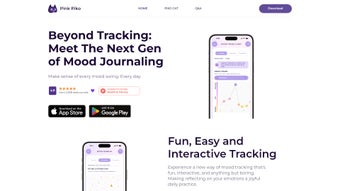
PinkPiko is an interactive AI‑driven mood journaling app that transforms the often‑overwhelming task of emotional self‑monitoring into a playful, insightful experience. At its heart lies Piko Cat, a friendly virtual companion that greets users each morning with a tailored prompt, inviting them to capture the nuances of their feelings, thoughts, and surrounding events. Unlike static diary tools, PinkPiko leverages advanced natural‑language processing to read through each entry, identify recurring patterns, and surface actionable insights that empower users to recognize triggers, celebrate mood improvements, and build emotional resilience. The app’s design draws from evidence‑based psychological research, ensuring that every question, tag, and visualization aligns with best practices in mental‑health journaling. Whether you’re a seasoned therapist, a busy professional seeking balance, or a teenager exploring self‑awareness, PinkPiko offers a secure, private, and free platform that grows with you, adapting its suggestions as your emotional landscape evolves.
Key Features that Make PinkPiko a Powerful Emotional Companion
- Daily AI‑Generated Prompts: Piko Cat delivers context‑aware questions each day, encouraging you to reflect on specific emotions, stressors, and successes.
- Smart Mood Tagging: As you type, the AI suggests mood tags (e.g., anxious, grateful, overwhelmed) that help categorize entries without extra effort.
- Personalized Insight Engine: After accumulating a week’s worth of logs, PinkPiko visualizes mood trends, highlights high‑impact triggers, and recommends coping strategies.
- Secure Cloud Sync: All entries are encrypted end‑to‑end and stored in a private cloud, allowing seamless access across devices while keeping your data safe.
- Interactive Mood Calendar: A color‑coded calendar shows daily mood intensity at a glance, making it easy to spot patterns over months.
- Export & Backup Options: Export your journal as PDF or CSV for personal archiving or to share with a therapist.
- Gamified Progress Badges: Earn badges for streaks, reflective depth, and consistent tagging, turning self‑care into a motivating habit.
- Multilingual Support: Available in English, Spanish, French, and Mandarin, ensuring broader accessibility.
These features work together to turn raw emotional data into clear, actionable knowledge. By automating the heavy lifting of analysis, PinkPiko lets you focus on the reflective part of journaling—understanding why you feel the way you do and how to navigate those feelings more effectively.
Step‑by‑Step Installation and How to Get the Most Out of PinkPiko
Getting started with PinkPiko is intentionally simple, allowing you to dive into self‑reflection without technical hurdles. Follow these steps to download, install, and integrate the app into your daily routine:
- Download the App: Visit the Apple App Store, Google Play Store, or the official PinkPiko website for Windows and macOS versions. Click “Download” and wait for the installer to finish.
- Create a Secure Account: Launch PinkPiko and sign up using an email address or a social‑login option. A strong password and optional two‑factor authentication keep your journal private.
- Set Your Preferences: Choose your preferred language, notification schedule, and whether you’d like Piko Cat to send morning or evening prompts.
- Start Journaling: Respond to the first prompt—typically “How are you feeling right now?”—and type freely. The AI will automatically suggest relevant mood tags and highlight key phrases.
- Review Insights Weekly: After seven entries, navigate to the “Insights” tab. Here you’ll see trend graphs, trigger analyses, and personalized tips (e.g., “Consider a short walk when stress spikes”).
- Sync Across Devices: Enable cloud sync in Settings. Your entries will appear instantly on any device logged into the same account, ensuring continuity whether you’re at home or on the go.
- Maintain Consistency: Set a daily reminder (the app suggests a gentle 5‑minute window) to keep your streak alive and unlock new progress badges.
By treating the app as a habit‑forming companion rather than a one‑off tool, you’ll quickly notice clearer emotional patterns, reduced overwhelm, and a stronger sense of self‑awareness. The intuitive UI, combined with AI‑driven guidance, makes each journaling session feel like a conversation with a trusted friend rather than a chore.
Platform Compatibility, Pricing, and an Honest Look at Pros & Cons
PinkPiko is available for iOS 14 and later, Android 8 and later, Windows 10 or newer, and macOS 10.15 Catalina onward. The app automatically adapts its interface to each operating system, delivering a consistent experience whether you’re on a phone, tablet, or desktop.
The core application is free to download and use. An optional premium tier, PinkPiko+, unlocks advanced analytics, custom theme packs, and priority support for $4.99 per month, but the free version already provides robust mood tracking and AI insights.
Pros
- AI‑generated daily prompts keep journaling engaging and relevant.
- End‑to‑end encryption ensures privacy of sensitive emotional data.
- Clear visualizations turn complex mood data into easy‑to‑read charts.
- Cross‑platform sync eliminates the need for manual backups.
- Free tier includes most essential features; premium is affordable.
Cons
- Some users may find the AI suggestions overly generic early on.
- Premium analytics require a subscription for full depth.
- Initial onboarding can feel lengthy if you opt for all customization options.
Overall, PinkPiko delivers a compelling blend of AI‑driven guidance and user‑friendly design, making it a standout choice for anyone serious about tracking and improving emotional wellbeing.
Frequently Asked Questions
Is my data really private?
Yes. PinkPiko uses end‑to‑end encryption for all journal entries and stores them on secure servers that comply with GDPR and CCPA standards. You can also enable a passcode or biometric lock for added protection.
Can I use PinkPiko without an internet connection?
All core journaling features work offline. AI analysis and cloud sync require an internet connection, but you can write entries anytime and they will be processed once you’re back online.
What makes PinkPiko different from other mood‑tracking apps?
The combination of a playful daily prompt (Piko Cat), real‑time AI tagging, and personalized insight dashboards is unique. Most competitors offer static charts; PinkPiko actively interprets your data and suggests coping strategies.
Is there a limit to how many journal entries I can store?
No. The free tier provides unlimited storage for all entries. Premium users get priority backup and extended export options, but storage is never a constraint.
Can I share my insights with a therapist?
Absolutely. You can export your journal or share a read‑only link directly from the app, allowing professionals to review trends without compromising your privacy.
Final Thoughts – Start Your Emotional Journey with PinkPiko Today
PinkPiko combines the latest AI technology with a compassionate design philosophy, turning daily mood tracking into an engaging habit rather than a burdensome task. Its free tier already offers powerful insights, while the optional premium upgrade adds deeper analytics for those who crave more granular data. By downloading PinkPiko, you gain a secure, cross‑platform companion that helps you recognize patterns, manage stress, and cultivate lasting emotional resilience. Take the first step toward greater self‑awareness—click the download button below, create your account, and let Piko Cat guide you toward a healthier mind.



.png)



